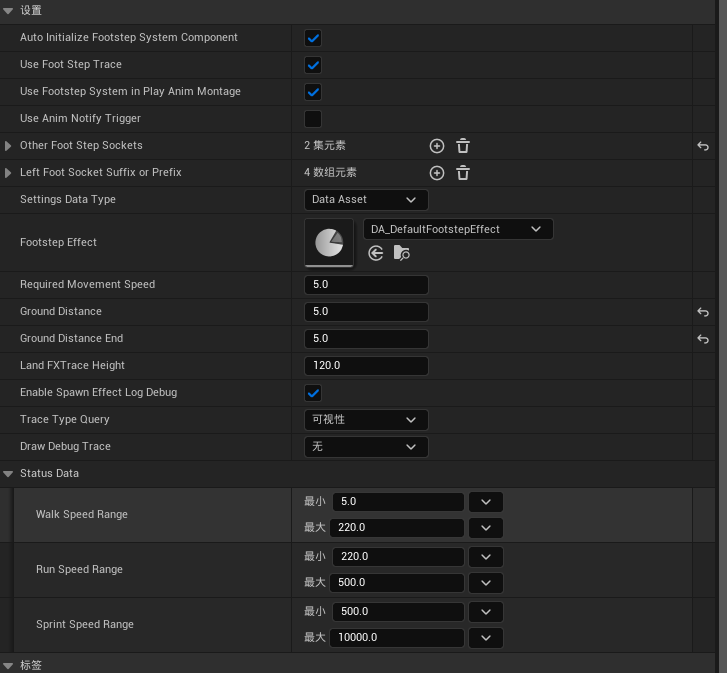
Auto Initialize Footstep System Component: Automatically initializes the footstep system component; by default, the initialization logic depends on whether the Owner is a Character.
Use Foot Step Trace: If you need to disable footstep detection, you can turn it off, and the footstep detection system will no longer work. In addition, you can now enable or disable this system at runtime.
Animation Notify Trigger:
UseAnimNotifyTrigger: Indicates whether an animation notify trigger is required. Defaults to false. If checked, the AnimNotifyTraceHeight variable will be added, and the automatic gait detection content will no longer be used.
AnimNotifyTraceHeight: Indicates the height used to detect the footstep ground position when using animation notifies. Defaults to 100.0 to ensure detection is not lost.
OtherFootStepSockets: A list of initial position socket names located at the feet for detection. You can configure any number of foot socket names here.
Left Foot Socket Suffix of Prefix: This is a filter for left-foot sockets. If a socket name contains a string in this list, it will be considered a left-foot socket; otherwise, it will be considered a right-foot socket.
Settings Data Type: Defaults to DataAsset. Because there is now a custom data asset editor, DataTable configuration will be deprecated in future versions!
Footstep Effect: Footstep effect data asset (if this is set, FootStepSettings will be hidden).
RequiredMovementSpeed: The minimum speed requirement for checking effect playback.
GroundDistance: How far from the ground the foot must be before it is considered in the air, and the footstep effect can be triggered after landing.
GroundDistance_End: If the foot is in the air, this distance will be used for checking. If the ground is detected, a footstep effect will be played once.
Enable Spawn Effect Log Debug: Enables logging of footstep sockets when spawning effects, displayed in the console. This is only valid in editor mode.
TraceTypeQuery: The trace type used when detecting the ground.
DrawDebugTrace: For debugging purposes only. Please restore it to the default value after completing effect detection.
Status Data: This determines whether the three types of effects are enabled in these movement states, as well as the speed ranges (the crouched state does not have this option).
Walk Speed Range: When the character's speed is within this range, it will be considered the Walk movement state.
Run Speed Range: When the character's speed is within this range, it will be considered the Run movement state.
Sprint Speed Range: When the character's speed is within this range, it will be considered the Sprint movement state.
Legacy Content (will be removed in a future version):
Added in V3:

UseAnimNotifyTrigger: Indicates whether an animation notify trigger is required. Defaults to false. If checked, the AnimNotifyTraceHeight variable will be added, and the automatic gait detection content will no longer be used. AnimNotifyTraceHeight: Indicates the height used to detect the footstep ground position when using animation notifies. Defaults to 100.0 to ensure detection is not lost.
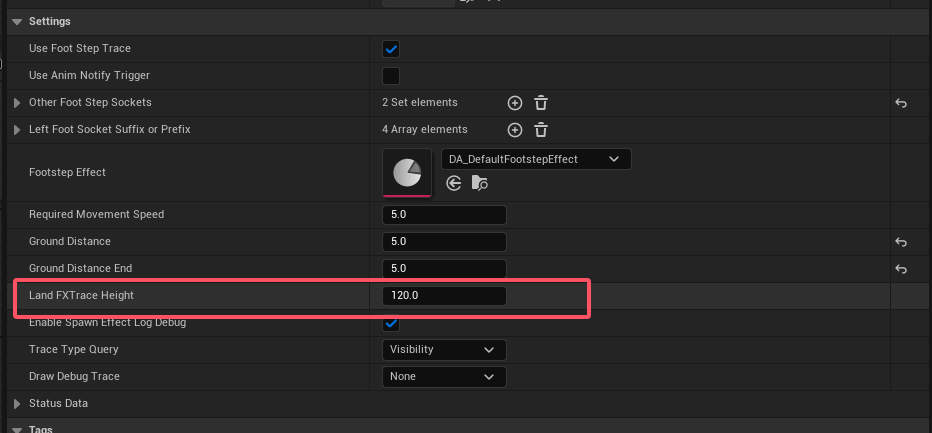
LandFXTraceHeight: Indicates the height used to detect when the character lands from the air and triggers LandFXEffect.
V2 Content:
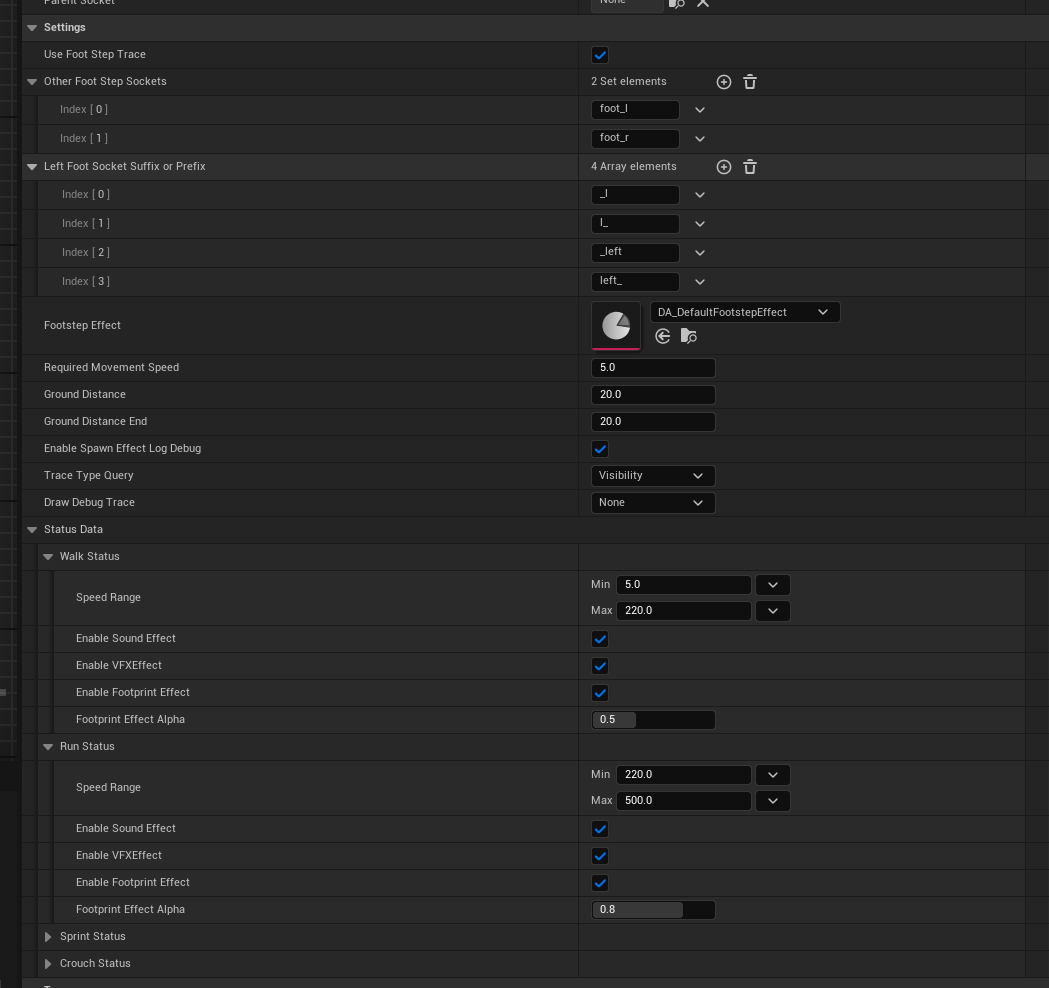
UseFootStepTrace: If you need to disable footstep detection, you can turn it off, and the footstep detection system will no longer work. In addition, you can now enable or disable this system at runtime.
OtherFootStepSockets: A list of initial position socket names located at the feet for detection. You can configure any number of foot socket names here.
Left Foot Socket Suffix of Prefix: This is a filter for left-foot sockets. If a socket name contains a string in this list, it will be considered a left-foot socket; otherwise, it will be considered a right-foot socket.
Footstep Effect: Footstep effect data asset (if this is set, FootStepSettings will be hidden).
FootStepSettings: Specific footstep effect settings (can be replaced by Footstep Effect (Data Asset)).
PhysicalSurface: Surface type (which physical surface this effect configuration applies to).
For other parameters, please refer to the documentation:
RequiredMovementSpeed: The minimum speed requirement for checking effect playback.
GroundDistance: How far from the ground the foot must be before it is considered in the air, and the footstep effect can be triggered after landing.
GroundDistance_End: If the foot is in the air, this distance will be used for checking. If the ground is detected, a footstep effect will be played once.
Enable Spawn Effect Log Debug: Enables logging of footstep sockets when spawning effects, displayed in the console. This is only valid in editor mode.
TraceTypeQuery: The trace type used when detecting the ground.
DrawDebugTrace: For debugging purposes only; after completing effect testing, restore it to its default value.
Status Data: This determines the enabled status of the three effect types under these movement states, as well as the speed range (this option is not available in the crouching state).
Speed Range: When the character's speed is within this range, it is considered the Walk movement state.
Enable Sound Effect: Whether to enable the footstep sound effect in this state.
Enable VFX Effect: Whether to enable the VFX effect in this state.
Enable Footprint Effect: Whether to enable the footprint effect in this state.
Footprint Effect Alpha: In this state, if the footprint effect is enabled, the footprint transparency will be set to this value.
Comments
Share your thoughts and discuss with everyone