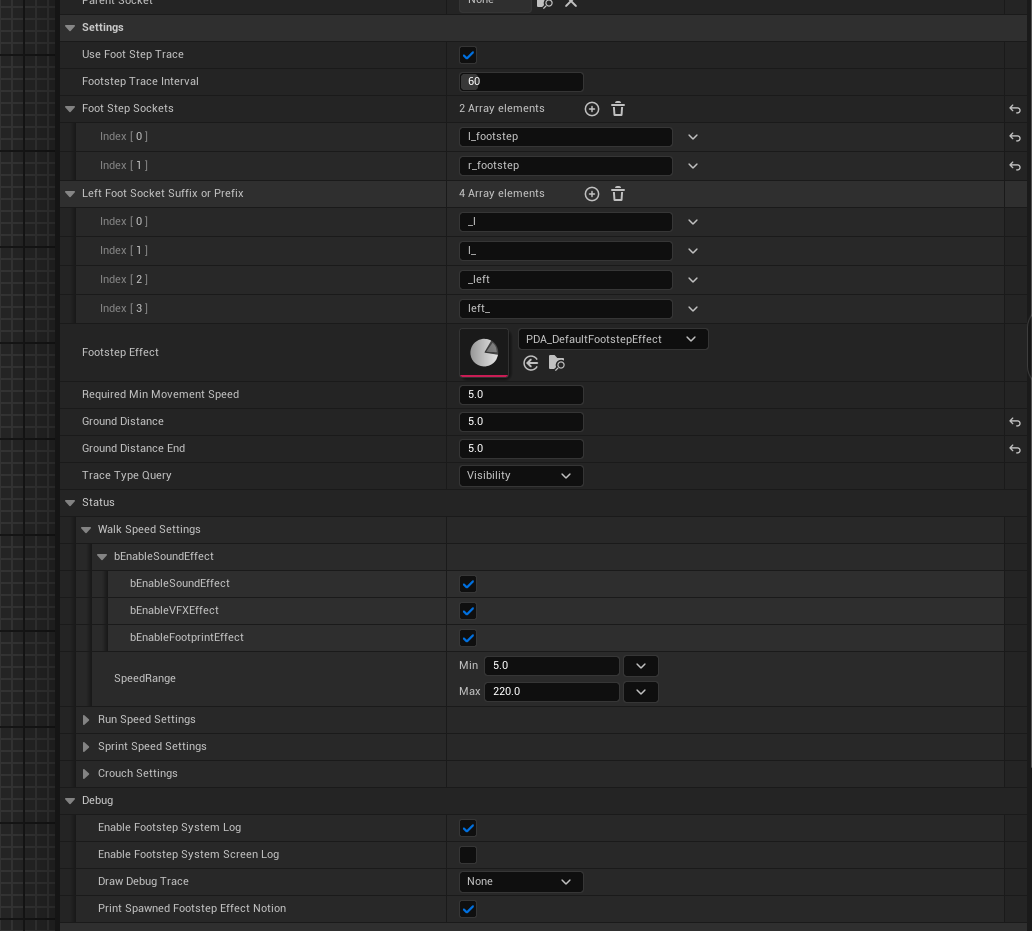
UseFootStepTrace: If you need to disable footstep detection, you can turn it off, and the footstep detection system will no longer function; additionally, you can now enable or disable the system at runtime.
FootStepSockets: A list of socket names for the initial positions on the feet used for detection. You can configure any number of foot socket names here.
Left Foot Socket Suffix of Prefix: This filters left-foot sockets. If a socket name contains a string from this list, it is considered a left-foot socket; otherwise, it is considered a right-foot socket.
Footstep Effect: Footstep effect Data Asset (if this is set, FootStepSettings will be hidden)
RequiredMovementSpeed: The minimum speed required for effect playback checks.
GroundDistance: The distance from the ground at which the footstep is considered airborne and can trigger a footstep effect after landing.
GroundDistance_End: If the footstep is airborne, this distance is used for checking; if ground is detected, a footstep effect will be played once.
TraceTypeQuery: The trace type used when detecting the ground.
Status Data: This determines whether the three types of effects are enabled for these movement states, as well as the speed range (crouch state does not have this option)
Speed Range: When the character's speed is within this range, it is considered the Walk movement state
Enable Sound Effect: Whether to enable the footstep sound effect in this state.
Enable VFX Effect: Whether to enable VFX effects in this state.
Enable Footprint Effect: Whether to enable footprint effects in this state.
Debug:
Enable Footstep System Log: Enables footstep system logs, displayed in the console. This is only valid in development mode.
Enable Footstep System Screen Log: Enables footstep system screen logs. This is only valid when Enable Footstep System Log is true. While displaying logs in the console, it also displays them on screen. This is only valid in development mode.
DrawDebugTrace: For debugging purposes only. After completing effect detection, restore it to the default value.
PrintSpawned Footstep Effect Notion: This is only valid when Enable Footstep System Log is true. When enabled, when a footstep socket triggers an effect, information will be printed to the console; if Enable Footstep System Screen Log is true, it will also be printed on screen.
Comments
Share your thoughts and discuss with everyone